

SD Card Speed Classes Explained: What V30, U3 and Class 10 Really Mean for Your Camera

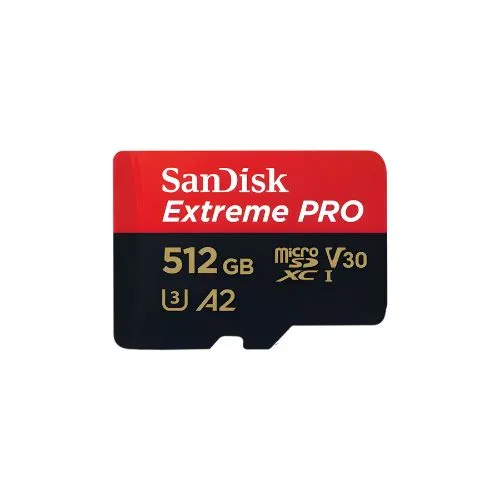
SD card speed classes show the minimum sustained write speed a card guarantees. Class 10, U1 and V10 mean at least 10 MB/s. U3 and V30 mean at least 30 MB/s. V60 and V90 mean 60 and 90 MB/s. For most photography and standard 4K video, a U3 V30 card is the sensible minimum.
Why Memory Card Labels Confuse So Many Buyers
Pick up almost any SD card and you will see a crowd of symbols on the front. A big number like 170 MB/s, a C with a 10 inside it, a U with a 3, a V30, an A2, and the letters XC or HC.
Most buyers look only at the storage size and the biggest speed number. That is exactly where problems start. The big headline number is usually the read speed, while the symbols that actually decide whether your camera records smoothly are the small ones.
We see the results of this regularly. A videographer’s camera stops recording halfway through a mehndi dance. A sports shooter waits ten seconds for the buffer to clear while the action continues. In both cases the card was “fast” on paper but too slow where it mattered.
This guide decodes every symbol, explains the reasoning behind each one, and shows you how to match a card to the way you actually shoot.
What Is an SD Card Speed Class?
An SD card speed class is a guaranteed minimum sustained write speed, set by the SD Association. It tells you the slowest speed the card will keep up while writing continuously, which is what matters for video recording and long bursts of photos.
The SD Association is the industry body that sets SD card standards. Brands like SanDisk, Lexar, Kingston, Samsung and Sony follow these standards, which is why the same symbols appear on cards from different manufacturers.
There are three speed class systems in use today, plus a separate class for phones and apps. Many cards carry all of them at once.
What Do All the Speed Symbols on an SD Card Mean?
Speed Class (C2, C4, C6, C10)
This is the original system, shown as a number inside a letter C. The number is the minimum write speed in MB/s.
| Symbol | Minimum Sustained Write Speed |
|---|---|
| Class 2 | 2 MB/s |
| Class 4 | 4 MB/s |
| Class 6 | 6 MB/s |
| Class 10 | 10 MB/s |
Class 10 was once the gold standard. Today it is the bare minimum, suitable for Full HD video and casual photography but not for modern 4K cameras.
UHS Speed Class (U1, U3)
This system appears as a number inside a letter U. It was introduced for faster UHS cards.
| Symbol | Minimum Sustained Write Speed |
|---|---|
| U1 | 10 MB/s |
| U3 | 30 MB/s |
Many camera manuals still list U3 as the requirement for 4K video, so this symbol is worth checking carefully.
Video Speed Class (V6 to V90)
This is the most useful system for anyone shooting video. The number after the V is the minimum sustained write speed in MB/s.
| Symbol | Minimum Sustained Write Speed | Typical Use |
|---|---|---|
| V6 | 6 MB/s | Basic HD video |
| V10 | 10 MB/s | Full HD video |
| V30 | 30 MB/s | Most 4K video, RAW burst photography |
| V60 | 60 MB/s | High bitrate 4K, high frame rate recording |
| V90 | 90 MB/s | Professional 4K and 6K at very high bitrates |
Application Performance Class (A1, A2)
A1 and A2 measure how quickly a card handles small random files, not continuous recording. They matter for smartphones, tablets and gaming consoles that run apps from a microSD card. They have little effect on how a camera records, so do not pay extra for A2 if the card is only going into a camera.
Read Speed vs Write Speed: Which One Matters More?
For shooting, write speed matters more. For transferring files to your computer, read speed matters more.
When you see “up to 200 MB/s” printed in large text, that is almost always the maximum read speed in ideal conditions. Write speed is often lower, sometimes much lower, and many brands print it only on the packaging back or the product page.
Here is a practical way to think about it:
- Write speed decides whether your camera can record video without stopping and how fast it clears the buffer after a burst of photos.
- Read speed decides how long you wait while copying a wedding’s worth of footage to your laptop.
Also note that some UHS I cards advertise read speeds above the standard UHS I limit. These speeds usually need the brand’s own card reader to achieve. In a regular reader or inside your camera, you will see lower numbers.
What Do SDHC, SDXC and SDUC Mean?
These labels describe storage capacity and the file system, not speed.
| Label | Capacity Range | Default File System |
|---|---|---|
| SD | Up to 2GB | FAT12/FAT16 |
| SDHC | Over 2GB up to 32GB | FAT32 |
| SDXC | Over 32GB up to 2TB | exFAT |
| SDUC | Over 2TB up to 128TB | exFAT |
Newer devices read older card types, but older devices may not read newer ones. A very old camera built only for SDHC may not recognise a 128GB SDXC card. Always check your camera manual for the largest supported type.
UHS I vs UHS II vs SD Express: What Is the Difference?
These describe the bus interface, which is the connection between the card and the device. You can spot a UHS I card by a Roman numeral I on the label, and a UHS II card by a Roman numeral II and a second row of gold pins on the back.
| Interface | Maximum Bus Speed | What It Means for You |
|---|---|---|
| UHS I | Up to 104 MB/s | Works in almost every camera, affordable |
| UHS II | Up to 312 MB/s | Faster burst clearing and transfers, needs a UHS II slot |
| UHS III | Up to 624 MB/s | Rarely seen in cameras |
| SD Express | Much higher, PCIe based | Very new, limited camera support |
The key point is compatibility. A UHS II card works in a UHS I camera, but it will run at UHS I speeds. You pay for speed you cannot use.
So before buying a UHS II card, check whether your camera’s slot supports it. Many entry level and mid range cameras from Canon, Nikon, Sony and Fujifilm have UHS I slots only, while higher end bodies often have at least one UHS II slot.
How Do I Choose the Right SD Card for My Camera?
Start with your camera manual, then match the card to your highest bitrate or fastest burst. The manual lists the minimum card class for each video mode. That is the most reliable source of truth, more than any shop advice or online list.
Follow these steps:
- Check the slot type. Find out whether your camera uses SD, microSD or CFexpress, and whether the SD slot is UHS I or UHS II.
- Find your highest video bitrate. Look in the video settings or manual for figures like 100 Mbps, 200 Mbps or 400 Mbps.
- Convert the bitrate to MB/s. Divide Mbps by 8. This gives the write speed your card must sustain.
- Add headroom. Choose a card class comfortably above that number, not just equal to it.
- Pick capacity based on your longest shoot. Consider how much you record before you get a chance to back up.
- Buy from a trusted source. This protects you from fake and relabelled cards, which we cover below.
A Simple Bitrate Example
Many mirrorless cameras record 4K at 100 Mbps.
100 Mbps ÷ 8 = 12.5 MB/s
A V30 card guarantees 30 MB/s, which gives you plenty of headroom. That is why V30 is the common recommendation for standard 4K.
Now take a camera recording at 400 Mbps:
400 Mbps ÷ 8 = 50 MB/s
A V30 card cannot keep up. You need at least V60, and V90 gives more safety margin. Note the difference between a lowercase b (bits) and uppercase B (bytes). Mixing them up is one of the most common buying errors.
Which SD Card Is Best for Different Types of Shooting?
| Type of Shooting | Recommended Minimum | Why |
|---|---|---|
| Casual photos and Full HD video | Class 10, U1, V10 | Low write demand |
| Wedding and event photography (RAW) | U3, V30 | Faster buffer clearing during key moments |
| Sports and wildlife bursts | V30 UHS I, or V60/V90 UHS II if supported | Long bursts fill the buffer quickly |
| Standard 4K video (around 100 Mbps) | U3, V30 | Comfortable headroom |
| High bitrate 4K (200 Mbps and above) | V60 or V90 | Prevents recording stops |
| Drones and action cameras | V30 microSD | Most 4K drones list U3 or V30 |
| Smartphones and gaming consoles | A2 microSD | App performance matters more |
These are general guidelines. Some cameras need CFexpress cards for their highest quality modes, especially 8K or internal RAW video, and no SD card will unlock those modes.
How Can I Tell If a Memory Card Is Fake?
Fake cards often report a large capacity but actually hold much less, and they usually write far slower than the label claims. The danger is that files seem to save normally, then become corrupted once the real capacity runs out.
Counterfeit memory cards are a known problem in markets worldwide, including Pakistan. Watch for these warning signs:
- A price that looks too good. A branded 256GB V30 card selling at a fraction of the usual price is a red flag.
- Poor printing. Blurry logos, uneven fonts or spelling mistakes on the card or packaging.
- Missing or odd packaging. Loose cards with no retail pack, or packaging that does not match the brand’s style.
- Slow real world performance. Video stops recording or transfers crawl even on a good reader.
To test a card properly, use free tools like H2testw on Windows or F3 on Mac and Linux. They fill the entire card with data and verify it, revealing the true capacity. A speed testing tool can also show whether the write speed matches the class on the label.
Common SD Card Mistakes to Avoid
- Buying by the read speed alone. The big number on the front rarely reflects recording performance.
- Paying for UHS II when your camera is UHS I. The extra speed is wasted inside the camera.
- Using one huge card for an entire wedding. If that card fails, you lose everything. Many professionals use dual slot cameras with recording to both cards at once, or rotate several smaller cards.
- Formatting on a computer instead of the camera. Formatting in the camera sets up the card exactly the way that camera expects.
- Deleting photos one by one on the camera for months. A regular full format in camera keeps the card cleaner and reduces fragmentation.
- Pulling the card out while the light is blinking. This can corrupt files or damage the card’s file system.
- Filling the card to the very last megabyte. Leave some free space, especially before a long video clip.
- Ignoring card age. Flash memory wears over time. Retire heavily used cards from critical paid work.
Expert Tips for Getting the Most From Your Memory Cards
Match your workflow, not just your camera. A YouTuber recording long talking head videos needs sustained write speed and high capacity. A sports photographer needs fast buffer clearing. A wedding shooter needs reliability and backup above all.
Keep a small rotation of cards instead of one giant card. Two or three 64GB or 128GB cards spread the risk across a shoot.
Use a good card reader. A cheap reader can bottleneck even the fastest card. A UHS II reader is worth it if you own UHS II cards.
Store cards in a hard case. Dust, moisture and static can damage contacts, especially in humid monsoon months. Our earlier guide on protecting camera gear from humidity covers storage in more detail.
Back up the same day. Copy files to a laptop and an external drive or cloud folder before formatting the card for the next shoot.
Key Takeaways
- Speed classes show guaranteed minimum write speeds, not maximum speeds.
- Class 10, U1 and V10 mean 10 MB/s. U3 and V30 mean 30 MB/s. V60 and V90 mean 60 and 90 MB/s.
- The big “up to” number on the front is usually read speed, which matters for transfers rather than recording.
- V30 is the practical minimum for most 4K video and RAW burst photography.
- Divide your video bitrate in Mbps by 8 to find the MB/s your card must sustain.
- A UHS II card only delivers its full speed in a UHS II slot.
- SDHC, SDXC and SDUC describe capacity, not speed.
- Test new cards with H2testw or F3 and buy from a trusted seller to avoid fakes.
Frequently Asked Questions
Is a Class 10 SD card good enough for 4K video?
Usually not. Class 10 guarantees only 10 MB/s, while most 4K modes need more sustained write speed and headroom. Many camera makers list U3 or V30 as the minimum for 4K. Class 10 is fine for Full HD video and everyday photos, but check your camera manual before relying on it for 4K.
What is the difference between V30 and V60?
V30 guarantees a minimum sustained write speed of 30 MB/s, while V60 guarantees 60 MB/s. V30 handles most standard 4K recording. V60 is better for high bitrate 4K, high frame rate modes and fast RAW bursts. V60 cards are usually UHS II, so they reach full speed only in a UHS II slot.
What does U3 mean on an SD card?
U3 is a UHS Speed Class rating meaning the card can sustain a minimum write speed of 30 MB/s. It is equivalent to V30 for most practical purposes. Many camera manuals list U3 as the requirement for 4K video, so a U3 card is a reliable choice for most modern mirrorless and DSLR cameras.
Can I use a UHS II card in a UHS I camera?
Yes. UHS II cards are backward compatible and work in UHS I slots. However, the card will run at UHS I speeds, so you will not get its full performance inside the camera. You will still benefit from faster transfers if you use a UHS II card reader on your computer.
Why does my camera stop recording video suddenly?
The most common reason is a card that cannot sustain the write speed your video mode needs. Other causes include a fake card, a nearly full card, a worn out card, overheating, or file size limits on older cards. Try a genuine card with a higher video speed class and format it in the camera first.
Do I need an A2 card for my camera?
No. A1 and A2 ratings measure random read and write performance for running apps on phones, tablets and consoles. Cameras write large continuous files, so the Video Speed Class and UHS Speed Class matter far more. Choose your camera card by its V or U rating instead.
What size memory card should I buy?
It depends on how much you shoot before backing up. For photos, 64GB to 128GB suits most users. For 4K video, 128GB to 256GB is more practical. Many professionals prefer several medium cards over one huge card, so a single card failure does not wipe out an entire event.
How long does an SD card last?
SD cards use flash memory, which wears out after many write cycles. A card used occasionally can last for years, while one filled and formatted every day for heavy video work will wear faster. Signs of a failing card include corrupted files, read errors and recording interruptions. Replace cards used for critical paid work regularly.
Choose a Card That Keeps Up With Your Camera
Memory card labels look complicated, but they follow a simple logic. The symbols tell you the minimum write speed, the interface tells you the maximum possible speed, and the capacity label tells you how much fits. Match those to your camera manual and your shooting style, and you avoid the frustration of stopped recordings and slow buffers.
If you are unsure which card suits your camera, FotoTrade has been helping photographers across Pakistan since 1990. Browse our memory cards, card readers and camera accessories online, or visit our shop on Chamberlain Road, Anarkali Bazaar, Lahore. Our team will happily help you find a genuine card that fits your camera and budget. Call or WhatsApp 0321 4555316.